Text to Music Generator Online Free: Arttribe vs MIDI Tools and Song Apps
Arttribe Text to Music is a text to music generator that turns a prompt into instrumental music and beats. How that compares with MIDI melody generators, stock libraries, and song apps.
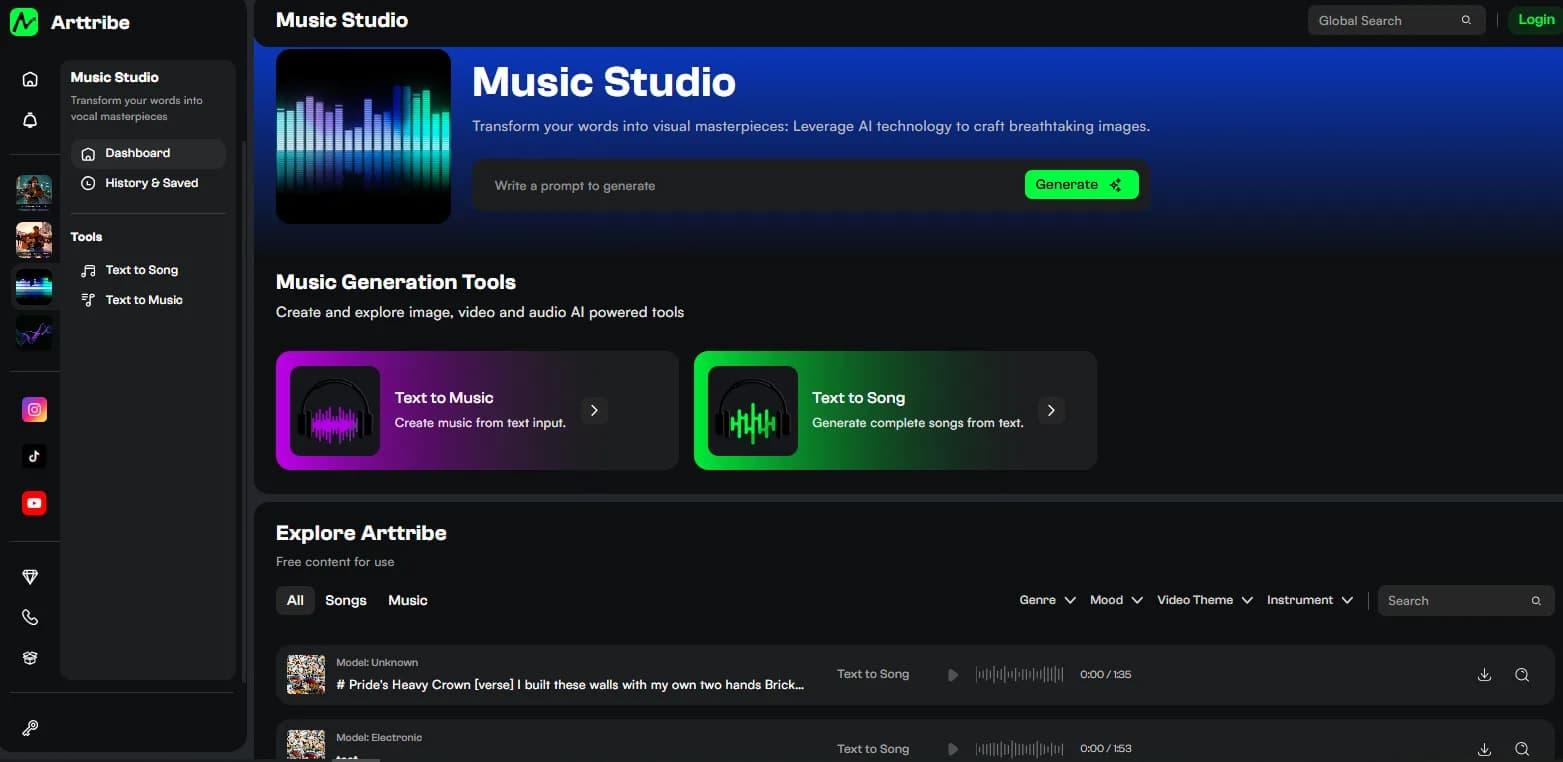
Arttribe Text to Music is a text to music generator online free to start. Type a prompt, pick a genre, generate, then listen and download. That AI music from text prompt is how you convert text to music here: prompt-to-track, not a file you upload.
The output is instrumental music and beats. It is a melody generator in the sense that it writes a playable tune. It is also a text to music maker for full beds and loops. It is not a MIDI piano-roll editor, and it is not Text to Song.
MIDI melody sites give you notes for a DAW. Song apps such as Suno and Udio treat the song as the product. Arttribe treats the track as one layer next to images, Image Editor, and Video Editor. If you only need a MIDI sketch, use a MIDI tool. If you only publish sung tracks, a song-first app can be simpler. If the file has to sit under picture, social, a game, or a remix, generate music from text in Music Studio and keep working in the same browser.
What the tool actually does#
Open Text to Music in Music Studio. Write a prompt that describes the music. Pick a genre. Hit Generate and wait. Then listen, download, and use the track anywhere.
Prompt is the brief. Name mood, tempo, instruments, and the kind of track you want. Example: lo-fi hip-hop, 85 BPM, warm keys, soft drums, no vocals. Ask for text to melody when you want a hook. Ask for text to instrumental when you want a bed or loop. The result is music from text you can drop under a video, a social clip, a game loop, or a remix.
Genre steers rhythm and instruments so you do not have to restuff the whole prompt. Keep tempo and use case in the prompt. Change genre or prompt, not both in the same run.
Generate, play the take, download it. Use it as a bed, a game asset, or a remix stem. Or generate stills, then put the beat under those images in Video Editor.
There is no duration slider and no model picker. Length comes from the brief. Vocals belong in Text to Song. The split is in text to music vs text to song.
This text to music converter is prompt-to-track. Do not expect a file-upload “convert my MP3” tool.
Why it is useful#
- Make music from text without a DAW. Describe the sound. Get a file. You do not need theory, MIDI, or a stock account to start.
- Beds that leave room for speech. Instrumental only, so VO and picture stay in front. That is the job AI music for video and social is built around.
- Same studio as picture. Generate stills in Text to Image, edit them, then finish the clip in Video Editor with this track in the background.
- Faster than hunting stock when the scene needs a specific mood that is not in the catalog.
- Use it anywhere. Download and drop it on YouTube, Reels, a game menu, or a remix session.
It is not useful if you need editable MIDI, a celebrity vocal, or a known licensed catalog cue. Those are different products.
How to compare it with other tools#
Do not compare “which 12-second demo sounds cooler.” Compare the job.
| Criterion | Arttribe Text to Music | MIDI melody generators | Standalone song apps (Suno, Udio class) | Stock libraries |
|---|---|---|---|---|
| Primary job | Instrumental as a production layer | Notes / piano-roll for a DAW | Song as the product | Licensed catalog search |
| Output | Finished audio: music and beats | MIDI or similar, not a mixed bed | Usually a full song, often with vocals | Premade tracks |
| Control | Prompt plus genre | Key, scale, piano-roll | Song-first iteration | Search, filter, license |
| Studio path | Images, Image Editor, Video Editor in one workspace | Export to a DAW | Export, then import into an editor | Download, then import |
| Best user | Video, social, game, remix work next to picture | Producers who will arrange in a DAW | People who only want to make and share songs | Teams that need a known cue and a license sheet |
This table is a job split, not a scored bake-off. MIDI tools and song apps change. Recheck them if a specific control (stems, MIDI export, cover) is your deal-breaker.
Where Arttribe is better#
Arttribe wins when the track is not the only asset.
You generate the instrumental in the same session where you generate stills and finish the cut. A text to music maker who needs a bed under an explainer does not need a ZIP from a music app and a second subscription to land the file on a timeline.
Finished audio is the other real win versus MIDI melody generators. Those tools answer “give me notes.” Text to Music answers “give me a file I can play under picture.”
Start-free-in-the-browser matters for trials. You can hear whether the prompt and genre get close before you commit to a plan. Text to music online, text to music free to start, no credit card.
Where other tools are better#
If you need MIDI into Ableton or Logic, a piano-roll melody generator is the right tool. Arttribe will not give you that file.
If the deliverable is a sung song and you never open Video Editor, Suno, Udio, or Arttribe Text to Song is the better first app. Text to Music will not write lyrics or an AI singer.
If legal wants a named catalog and a license PDF, stock still wins. Prompted music is a new cue, not a known track.
Arttribe’s control list is short. There is no duration slider. Length comes from how you write the brief, which is less precise than a music app that exposes bars and stems.
Do not pick Arttribe because it “beats Suno at sounding like a record.” Pick it because the rest of the job is already here: stills, edit, timeline, instrumental bed.
Who should use which#
- Choose Arttribe Text to Music if you need instrumental music and beats from a prompt, and you will use the file in video, social, games, or a remix. Start at the text to music landing, then open the tool.
- Choose a MIDI melody generator if the next stop is a DAW piano roll.
- Choose a standalone song app or Arttribe Text to Song if someone should sing.
- Choose stock if you need a catalog cue and paperwork.
For the beds-vs-songs decision, use text to music vs text to song. For controls, use Music Studio settings.
A short production path#
- Describe the music. Set genre. Generate in Text to Music.
- Listen. Download the take you keep.
- Generate stills in Text to Image. Edit them in Image Editor if the frame is not done.
- Put the beat under those images in Video Editor. Or skip picture and use the file anywhere else.
That path is the Arttribe argument. Everything else is a demo.
FAQ#
Is Arttribe a text to music generator online free? Yes to start, no credit card. Check the plan for limits and commercial use.
Is this a text to music converter I upload a file into? No. Convert text to music means prompt-to-track.
Is this a MIDI melody generator? No. You get instrumental audio, not a piano-roll.
Can I make music from text for video and social? Yes. That is the main job.
When should I skip Text to Music? When you need vocals and lyrics. Use Text to Song.
Try this in Arttribe
Open the matching studio and run the workflow from this article.
Open Text to Music